
A phone buzzes at midnight, then silence. The familiar profile picture no longer loads. For readers asking how to know if someone blocked you on Instagram, this report sets out what actually happens on the app and what it usually means. Short, plain facts. Small field notes from daily use. That’s how it reads here.
What Happens When Someone Blocks You on Instagram
A block cuts visibility at the roots. The account becomes unreachable to the blocked party even if an old link exists. Search stops returning the profile. Past comments may show as plain text without a tappable handle. Stories vanish like they were never there. Feels abrupt, and it is.
For the person applying the block, the feed clears up instantly. No messages arrive. No tags come through. The wall goes up on both sides, though one side notices more. That’s how it looks, honestly.
Key Signs That Indicate You’ve Been Blocked
Newsrooms track recurring patterns. Regular users see the same. Core signs line up in clusters.
- Username fails to appear in search, even with exact spelling.
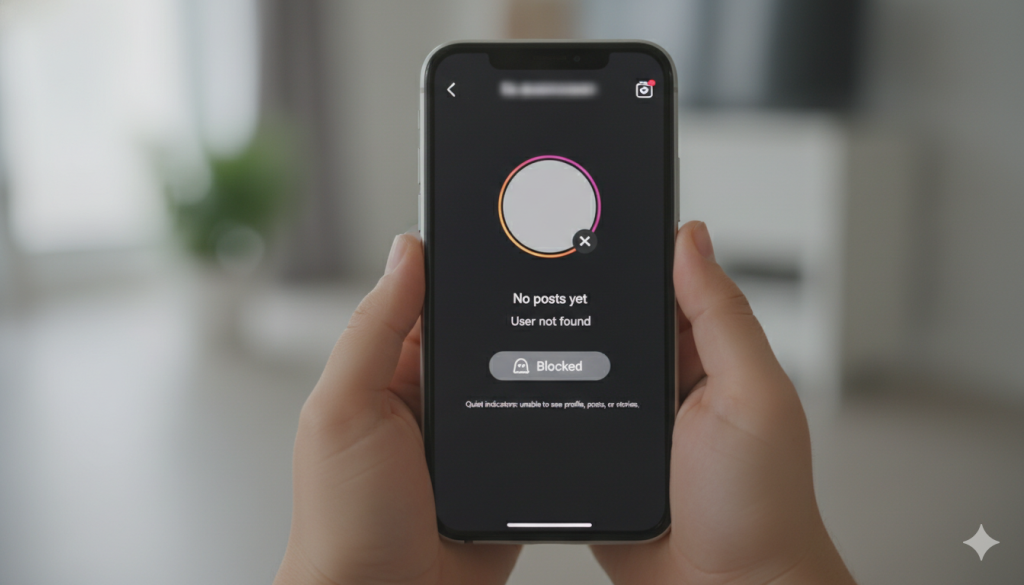
- Old profile links open to a blank grid or a “User not found” screen.
- The follow button, if visible at all, resets after tapping.
- Past messages remain in the inbox, but delivery never changes
- A friend can open the profile normally. The blocked party cannot. Sometimes it feels unfair.
One sign alone can mislead. Three or more signs together usually tell the real story.
Why You Can’t Find Their Profile or View Their Posts
Search relies on visibility permissions. A block removes permission at the source, so the profile stops resolving for the blocked account. That is why the handle fails to auto-complete and the profile grid appears empty. In some cases the header still shows a name with a round avatar space that never fills. Like a door with the nameplate still there but the keyhole sealed.
Another wrinkle. If the other person deactivated the account or changed the username, search also fails, but friends will not see the profile either. Cross-check settles the doubt. Small step, big clarity.
How DMs, Mentions, and Tags Change After a Block
Direct messages behave in a quiet, stubborn way. The thread may remain, but new notes hang in a sent state. No delivery change. No seen marker. No profile card expanding at the top of the chat. It feels like talking into a switched-off mic.
Mentions slip too. The handle stops appearing in suggestions while typing in captions or comments. Even manual typing does not link. Tags on photos no longer connect to a profile page. For group chats, the blocked party still sees the thread, though any route back to the blocker’s profile is gone. Technical, yes, but visible enough for daily users. Sometimes it’s the small habits that matter.
Cross-Checking With Another Account: The Most Reliable Method
Editors prefer confirmable steps. So do users. The plain method is simple. Log in through a second account, or ask a trusted friend to check. If the friend opens the profile, views posts, and sees stories, while the first account cannot even load the page, the result points to a block. No drama. Just comparison.
For privacy reasons, do not chase the person across many accounts or ask others to send messages on behalf. That usually makes outcomes worse. Feels harsh, but fair.
Block vs Restrict vs Unfollow: What’s the Difference?
| Action | What the viewer sees | Interactions allowed | Typical clue |
| Block | Profile unreachable, posts hidden, search fails | No DMs delivered, no tags or mentions | Old links break or show blank grid |
| Restrict | Profile visible, comments limited in visibility | DMs move to requests, activity status hidden | Comment appears only to commenter unless approved |
| Unfollow | Profile visible as per privacy setting | DMs normal, tags normal | Only the follow state changes, nothing else |
That table matches everyday reports. Not theory.
What You Should Do Next If You Suspect You’re Blocked
First, pause. Screens heat up, tempers rise, mistakes happen. Then take the steady route. Confirm through one clean cross-check. If a block seems clear, accept the boundary and avoid repeated attempts to view or contact. No good ever comes out of chasing. If contact remains necessary, use a neutral channel outside social platforms, and only for practical matters. Keep it brief. Keep it calm.
For those writing community guidelines or advising teams, the lesson repeats. Blocks exist to reduce friction and keep feeds quiet. The signs above describe how to know if someone blocked you on Instagram without guesswork. Not perfect proof, but strong enough for daily decisions. And that is usually enough for sane use.
Keep Reading
FAQs About Instagram Blocking
Can messages reach the other person after a block is placed on the account?
No, new messages stay in a sent state inside the original thread and never flip to be delivered.
Can a profile still appear in search after a block has been applied?
In regular cases, the handle disappears, though cached results may linger briefly before clearing out.
Do past likes and comments remain visible on older posts after a block?
They may remain as plain text or disappear from view, with no path back to the profile page.
Can a block look similar to an account deactivation event sometimes?
Yes, which is why cross-checking through a separate account helps clear the confusion quickly.
Is there any official notification that confirms a block on Instagram?
No, the platform does not send alerts, so users rely on consistent behavioural indicators instead.
